
Vision Jet

MODERNIZED SIMPLICITY
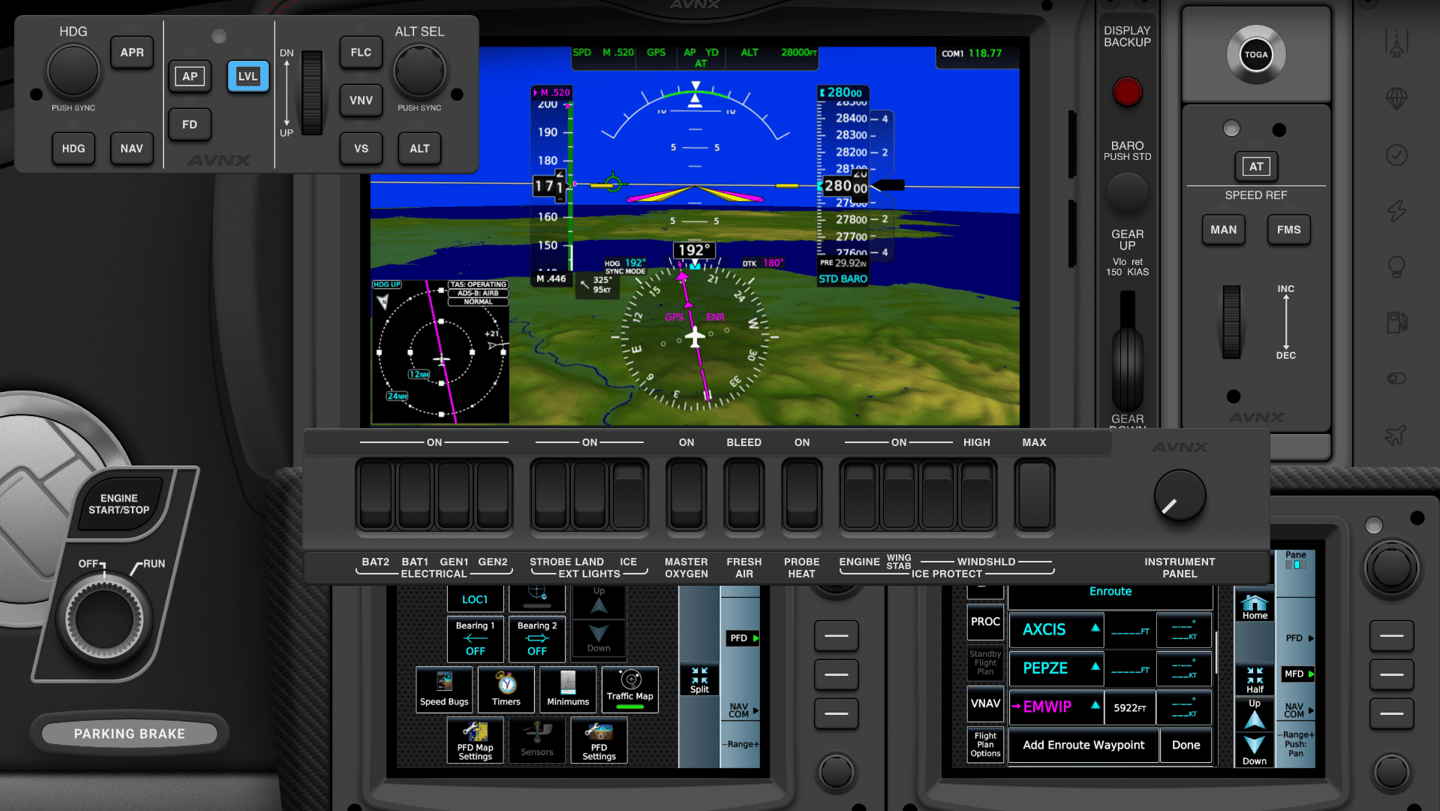
For the Vision Jet we build a special in house script that allows the panel to darken automatically as the outside environment changes. This means that when you fly into the sunset, your panel will just like the virtual cockpit darken automatically making all instrument lighting show illuminated.
If all of this is a bit to much for you, you can still brighten the panel by using the flood light controller on the co-pilot side.
PREMIUM QUALITY FOR FREE
This panel is available for free directly inside Air Manager 5.
Please note: We are not affiliated with Air Manager. We are an independent content provider.
More information about Air Manager can be found on https://www.siminnovations.com
The Vision Jet redefined the skies as the world’s first single-engine personal jet, blending high-performance turbine power with a sleek, pilot-centric philosophy. With the AVNX Vision Jet touch panel, our goal was to capture that cutting-edge "jet life" spirit and translate it into a modern, tactile interface that mirrors the sophisticated vision jet cockpit.
EMBRACING THE FUTURE OF FLIGHT
We wanted to reflect the innovation that makes the Vision Jet a modern icon. By recreating that ultra-modern, streamlined atmosphere, we are giving you the opportunity to command the world’s most advanced light jet with incredible precision directly within Microsoft Simulator 2024.
Every layout choice and system interface has been meticulously mapped to capture an authentic, high-tech feel. Whether you are a beginning or endured Vision Jet sim pilot, the AVNX Vision Jet panel delivers a premium, hands-on experience that leaves the mouse and keyboard on your desk.
ADVANCED SYSTEMS CONTROL
We have made the panel in a way that it's focussed on the instruments that are required during the specific phase of flight of that moment. This means that the split dual monitor touch setup always shows the primary inputs and output.
The PFD and MFD, in combination with the GTC touch controllers and throttle controls are always in view, while other instruments can be shown or hidden with our custom UI controller.
In practice this means that when you start the airplane, you can pull up the engine starter instrument, bolster panel and checklist controller. While they can and should be hidden during taxi to the active runway for take-off. Immediately on take-off you can pull up your autopilot to engage the AP master and set the NAV and FLC modes to active.
In this way you always have access to what you need, without lose the maximum screen estate to what is important to you.